App links
Croatian-language contact cleaner
Tidy a messy address book without ever wondering what just got overwritten.
Očisti Kontakte — Duplikati is a Croatian-language app that finds duplicate contacts on iPhone and iPad and lets you review and merge them on your own terms.
Quick facts
- Pricing
- Free to download with 5 free merges, plus a one-time Premium purchase for unlimited merges and no ads.
- Platforms
- iPhone, iPad
- Best for
- Croatian speakers and diaspora users who want a careful, Croatian-language tool to clean up duplicate contacts.
- Availability
- App Store ID 6760232303
It scans your address book, groups likely duplicates, shows a merge preview before anything is written, and saves a local backup first — so cleanup stays careful and reversible.
Launch kit
Očisti Kontakte — Duplikati links, release notes, and shipping details
This section keeps the practical launch information in one place so the page can work as a product landing page, support hub, and handoff point for future catalog growth.
Launch details
- Pricing
- Free to download with 5 free merges, plus a one-time Premium purchase for unlimited merges and no ads.
- Platforms
- iPhone, iPad
- Current version
- 1.1
- Last updated
- May 1, 2026
- Category
- Productivity and utility tool
- App Store ID
- 6760232303
Latest release
Safer previews and clearer backups
This release improves duplicate grouping by name, phone and email, sharpens the merge preview, and makes local backup files easier to find in settings before you confirm changes.
What it helps with
What Očisti Kontakte — Duplikati helps you do
This page is designed to explain the app clearly, show how the workflow fits together, and help the right user decide quickly whether the product is a fit.
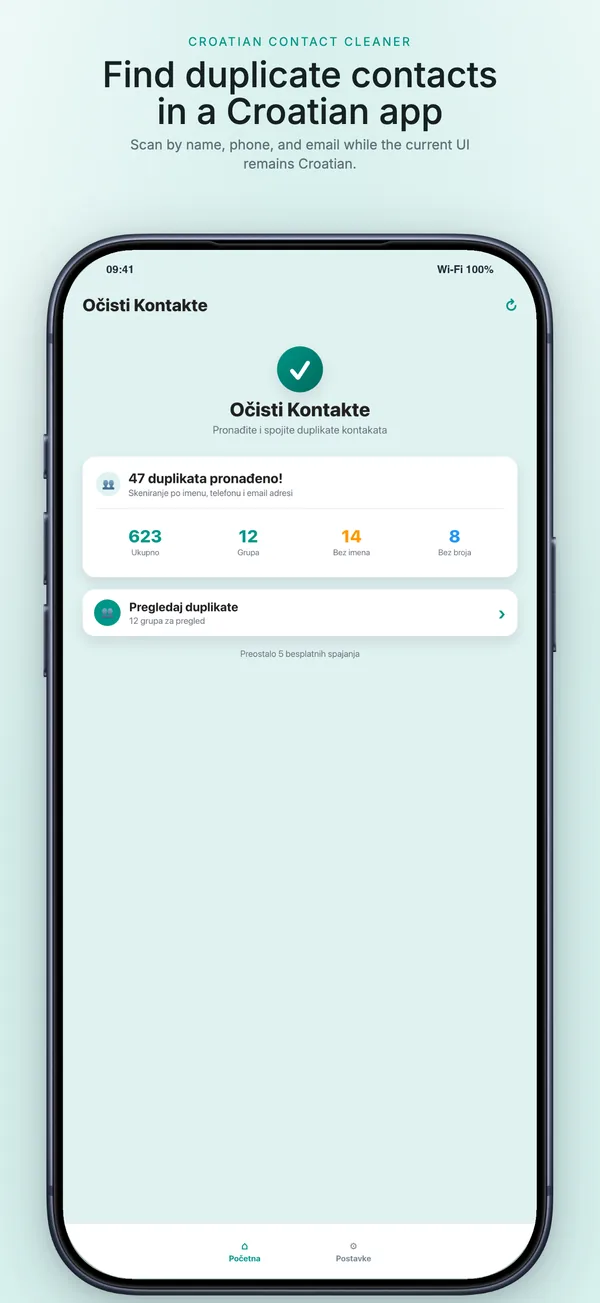
It scans your address book, groups likely duplicates, shows a merge preview before anything is written, and saves a local backup first — so cleanup stays careful and reversible.
Key signals
5 Free merges
Preview Before any change
Backup Local JSON file
On-device No server upload
- A local backup is created before any merge
- Nothing is bulk-merged silently in the background
- Contact processing happens on your device, no account
- Premium is a one-time purchase, not a subscription
Product screens
Očisti Kontakte — Duplikati in use
Step by step
How Očisti Kontakte — Duplikati fits into the workflow
Scan your address book
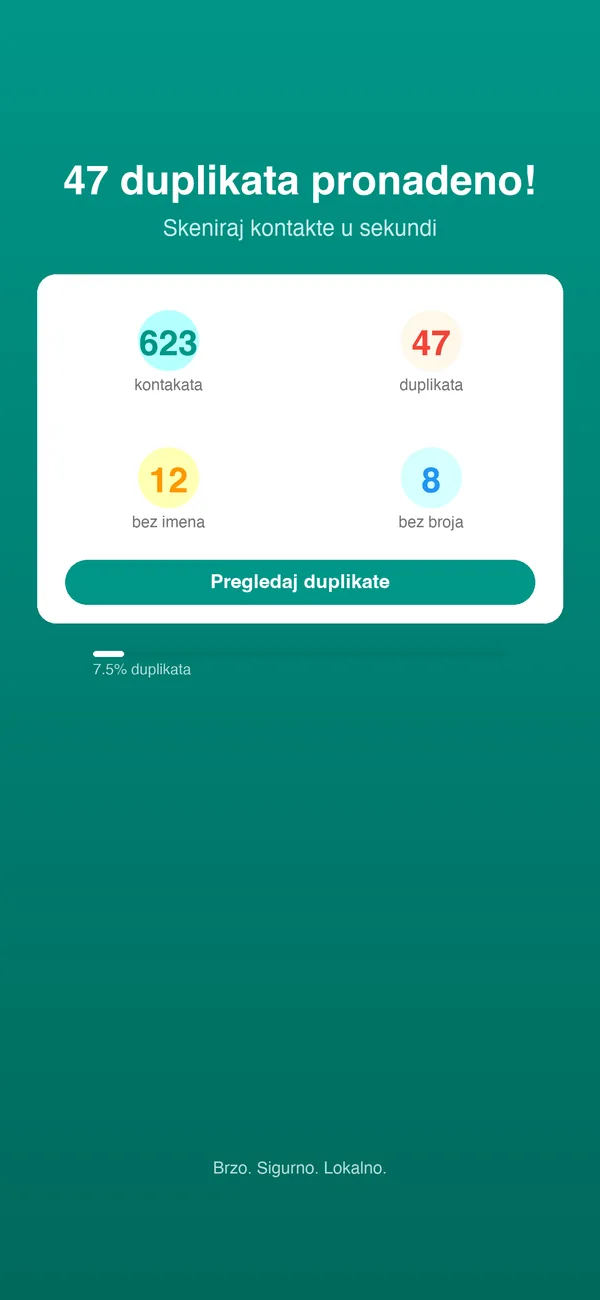
The app finds possible duplicates by name, phone number and email and groups related ones together.
Review and preview each merge
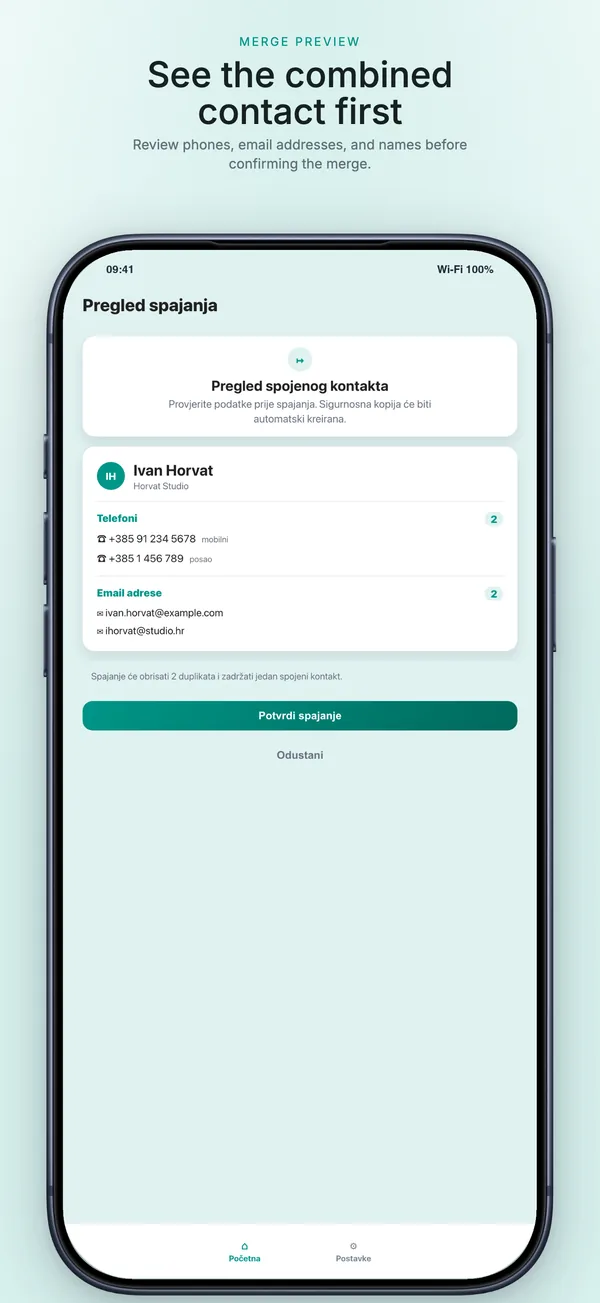
Look at each duplicate group, see exactly how the merged contact will look, or choose which single contact to keep.
Back up, then confirm
A local backup is written before changes, and you get a cleanup summary once the groups are processed.
Feature detail
Why teams choose Očisti Kontakte — Duplikati
Find duplicates
Catch the duplicates a quick scroll misses
Duplicates creep in across name spellings, numbers and email addresses, so the app checks all three and clusters related entries for review.
- Detects duplicates by name, phone number and email
- Groups related duplicates so you can review them together
- Croatian-language interface throughout
Stay in control
You decide what changes, every time
Contact cleanup is sensitive, so the app never merges in the background — every change is previewed and confirmed by you.
- Merge preview before your address book changes
- Choose which contact to keep instead of a full merge
- Cleanup summary after duplicate groups are processed
Safety first
A backup before anything is touched
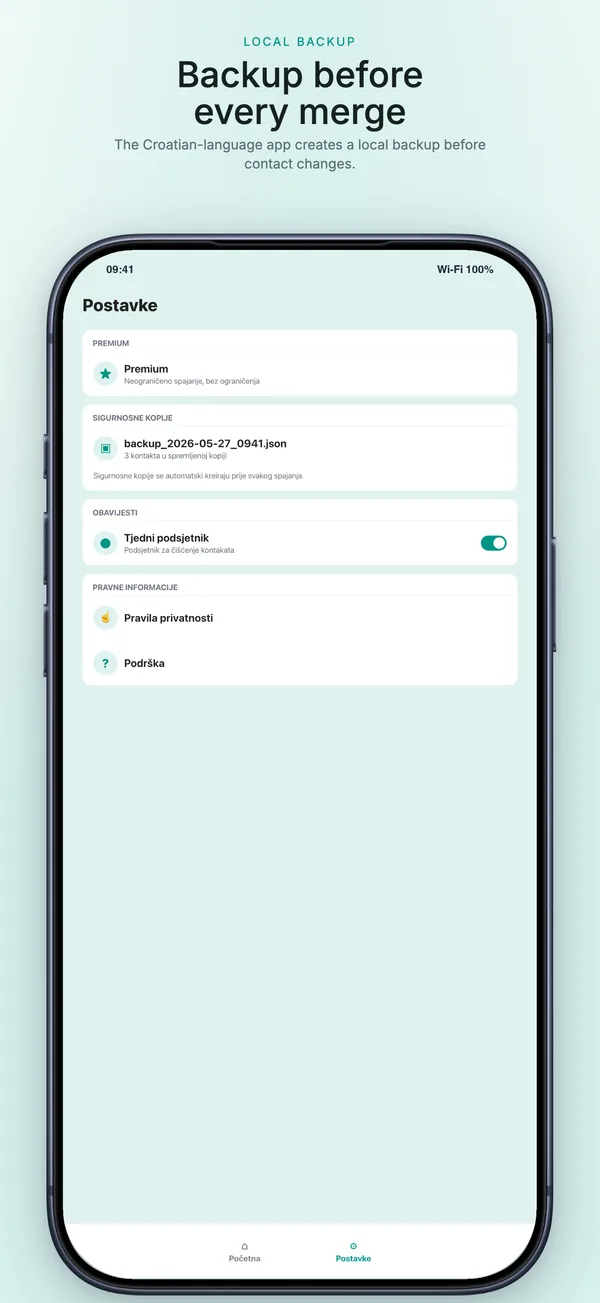
Because merges write to your real Contacts, the app saves a local backup first and keeps it listed where you can find it.
- Local JSON backup created before merging
- Backup files listed in app settings
- Premium unlocks unlimited merges and removes ads
Recent updates
What has changed recently in Očisti Kontakte — Duplikati
A lightweight release history helps these app pages act like living product documents instead of frozen launch announcements.
1.1
Safer previews and clearer backups
This release improves duplicate grouping by name, phone and email, sharpens the merge preview, and makes local backup files easier to find in settings before you confirm changes.
Best fit
Who Očisti Kontakte — Duplikati is built for
Croatian speakers
For people who want a contact cleaner that works in Croatian, not a translated afterthought.
Diaspora users
For Croatian diaspora users juggling contacts across phones, SIMs and accounts.
Careful cleaners
For anyone who wants to tidy an address book but refuses to risk a silent bulk merge.
Questions
Questions people ask before downloading Očisti Kontakte — Duplikati
What language is the app in?
The interface is Croatian. This English listing is for Croatian speakers and diaspora users; do not install it expecting a fully English UI.
Will it back up my contacts before merging?
Yes. A local JSON backup is created before any merge and is listed in the app settings.
Does it upload my address book?
No. Contact processing happens on your device using Apple's Contacts framework, with no account and no server upload.
How many merges are free?
The free version includes 5 merges. Premium is a one-time purchase that unlocks unlimited merges and removes ads.
Beyond the app
Need something more tailored than Očisti Kontakte — Duplikati?
If your team wrestles with duplicate or messy records beyond a phone's contacts — a CRM, a customer database, a member list — I can build a tailored dedupe and cleanup tool with the previews, backups and rules your data demands.
- Custom deduplication for CRMs and customer databases
- Preview, backup and undo built into the workflow
- Matching rules tuned to your records and language
Bigger workflow
If this app opens up a bigger problem
The app may solve a concrete job immediately. If it exposes a larger operational, web, or content problem behind it, these are the closest practical routes.
Operational systems
If the workflow behind the app reveals manual steps, approval layers, tool sprawl, or operational debt, this is where it becomes a real system.
Web platforms
If this direction points toward a portal, stronger web layer, SEO surface area, or client-facing interface, this is the closest next route.
Related writing
The Difference Between Automation That Helps and Automation That Compounds
Most automation saves time once. System-level automation saves time forever — and gets better the longer it runs. The difference is in the architecture.
Building Internal Tools vs Buying Off the Shelf
Notion, Airtable, and off-the-shelf tools work — until they don't. Custom internal tools work — until nobody maintains them. Here's the decision framework.
Airtable, Monday, Asana — Why the Tool Doesn't Matter
Teams debate tools endlessly. The tool is almost never the problem. The process underneath, the ownership, the behavior—that's what breaks.
Related case studies
Enaviga: Building the Sales Playbook Behind a Charter-Tech Product
A progression from visual asset production into business development, sales structure, market validation, and operational content systems for a boating-tech startup.
Dentelli: Acting as an Embedded Growth Partner During a Premium Clinic's Scale-Up
A multi-year embedded role spanning content, campaigns, events, reporting, and growth execution while a premium dental clinic scaled significantly in Split.
Očisti Kontakte — Duplikati
Download Očisti Kontakte — Duplikati, then extend the workflow if your team needs more.
Start with the shipping app when it solves the core job. If you later need approvals, reporting, portals, or a more specialized internal workflow, that can become a custom build.